
Planning your security system? Knowing CCTV Camera Storage Capacity in Days is important for nonstop security without gaps. At Shaktivault Technologies, we help Gurgaon businesses and homeowners find the right storage for reliable security coverage.

What is CCTV Camera Storage Capacity?
Understanding CCTV Recording Storage
The capacity of a CCTV camera’s storage is the amount of video that the camera system can record and store. Older files are erased when storage capacity is exhausted. It is based on the size of your hard drive, as well as camera resolution and recording settings. It doesn’t matter if you’re using the DVR (Digital Video Recorder) or NVR (Network Video Recorder); knowing your storage needs can help. This helps you avoid missing important footage when you require it the most.
Why Storage Capacity Matters for Security Systems
Storage capacity is not enough, and it is a common CCTV installation mistake. The capacity of your storage determines the length of your retention time. This is the number of days that you are able to review previous footage. To review incidents and ensure legal compliance, the majority of firms require 30-90 days of archived footage. Homeowners typically require a minimum of 1-2 days of surveillance.
Factors That Affect CCTV Storage Duration
Camera Resolution and Video Quality
Higher-resolution cameras capture clearer details but consume more storage space. A 4K camera generates significantly more data daily than a 1080p model. Resolution is a key factor in storage calculations. It works with bitrate to determine daily storage use.
Number of Cameras and Recording Hours
Multiple cameras can increase storage needs. Four cameras in a Full HD setup that is recording continuously for 30 days will require about 2.6 trillion TB of storage. If you add more cameras, your storage requirements increase in the same way.
The time you record is important as well. Continuous 24/7 recording requires more memory than motion-based recording.
How to Calculate CCTV Camera Storage Capacity in Days
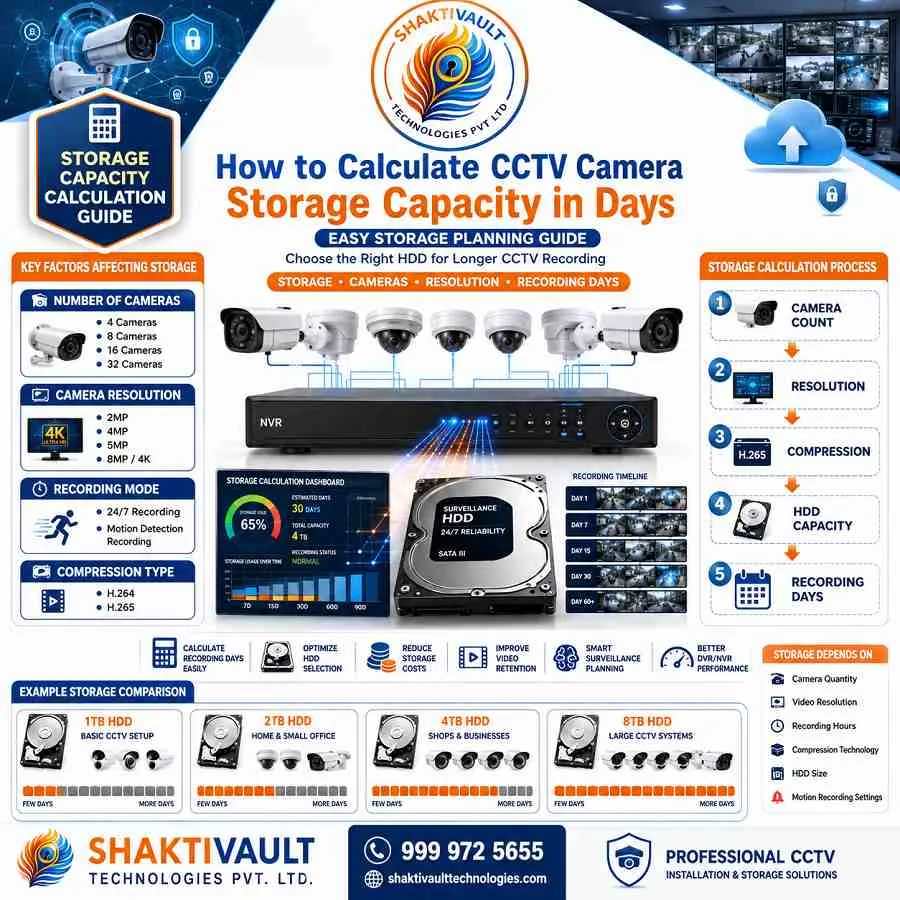
Storage Formula for DVR and NVR Systems
The most common calculation uses this formula: daily gigabytes times the number of days equals the storage space needed. Particularly, bits per second (Kbps), frames per second (FPS), the number of cameras, and retention days matter. This will help you decide if the 1TB, 2TB, or 4TB hard disk will meet your security requirements.
Estimating Recording Days Based on Hard Drive Size
To figure out the recording days to find the days that record, divide the capacity of your storage by the daily usage of data. For instance, your camera that has 4MP resolution could record at 15 frames per second and consume 40- 60 GB per day.
A drive with 2TB capacity can then hold 30 to 50 days of uninterrupted video. The amount of time depends on the detail of the scene and motion.
CCTV Hard Drive Capacity and Recording Duration
1TB, 2TB and 4TB Storage Examples
- 1TB storage: 4 cameras recording 24/7 = approximately 7-10 days
- 2TB storage: 4 Full HD cameras = 30 days of continuous recording
- 4TB storage: 8 cameras = 30-40 days depending on resolution
These are estimates. Actual retention depends on camera bitrate, compression, and scene activity.
Expected Recording Days for Different Camera Setups
A single high-resolution camera may record for over 60 days on 2TB. However, 16 cameras recording at once may keep only 7 to 15 days on 2TB. Your specific setup’s bitrate determines actual capacity.
Ways to Increase CCTV Storage Capacity
Using H.265 Video Compression
H.265 compression (HEVC) reduces file size by 40-50% compared to H.264. It keeps the same video quality. This technology doubles storage retention on existing hard drives.
It lets you keep more footage for longer without hardware upgrades. Shaktivault Technologies uses this cost-effective solution in modern systems.
Motion Detection Recording vs Continuous Recording
Moving between continuous and motion-triggered recording can save a huge amount of storage. In low-activity zones, motion detection can save space and store weeks or days of footage. Continuous recording could take up storage space quickly. Hybrid methods make use of continuous recording in high-risk areas and motion detection elsewhere. This enhances security and helps save storage space.
Choosing the Right Storage Solution
DVR Storage vs NVR Storage
NVR systems scale better. They support cloud storage and higher-resolution cameras. DVR systems offer low-cost, local storage but have limits on hardware expansion. NVR systems can meet growing storage needs using network-attached storage or cloud integration.
Local Hard Drives and Cloud Storage Options
Local storage is a one-time hardware purchase, and there is no cost per month. Additionally, it requires security as well as regular maintenance. Cloud storage is able to backup files in a way that is automatic. It also offers remote access as well as geographic redundancy. It does require subscription charges. Modern systems often use hybrid strategies. These mix both to improve stability and flexibility.
Common CCTV Storage Mistakes to Avoid
Insufficient Hard Drive Capacity
Undersizing storage leads to overwritten footage before proper review. Always calculate with growth in mind—plan for 1.5x your current needs.
Ignoring Backup and Data Retention Requirements
Without backup systems, a hard drive failure can cause permanent footage loss. Use redundant storage and make regular backups for mission-critical recordings.
Conclusion
Optimize CCTV Storage for Longer Recording and Better Security
Proper storage capacity calculation ensures your CCTV system captures every moment that matters. Whether you’re upgrading to H.265, adding motion detection, or moving to cloud storage, you should understand these factors. They will help you protect your property.
Ready to optimize your CCTV storage capacity? Contact Shaktivault Technologies today at +91 – 981 094 0561. Get advice from an expert on the ideal camera storage solution for your Gurgaon property. We provide great prices on CCTV systems that are professional and feature intelligent storage solutions that are customized to your security needs. We can help you get constant, reliable surveillance without compromising.
About Shaktivault Technologies: Your trusted partner for CCTV and security camera solutions in Gurgaon and nearby areas. We provide quality surveillance systems with expert installation and ongoing support.
FAQs – CCTV Camera Storage Capacity in Days
How much storage do I need for a CCTV system?
Estimate daily GB per camera. It depends on resolution, FPS, and bitrate.
Multiply by the number of cameras and retention days.
Add 1.5x for growth and reliability.
How many days of footage should businesses keep?
Most businesses keep records for 30–90 days to meet review and compliance needs. Choose a time based on risk and legal requirements.
Does camera resolution affect storage?
Yes. Higher resolution (4K vs 1080p) and higher FPS increase bitrate and storage use significantly.
Which is better for scaling: DVR or NVR?
NVRs scale well for high-resolution cameras, network storage, and cloud options. DVRs are simpler and cheaper for analog systems.
Will switching to H.265 reduce my storage needs?
Yes. H.265 (HEVC) often cuts file sizes by about 40–50% versus H.264. It keeps similar quality. This can double retention on the same drive.
Should I use continuous recording or motion detection?
Use motion-triggered recording in low-activity areas to save storage.
Use continuous recording in high-risk zones or where constant monitoring is needed.
How can I prevent losing important footage?
Use enough capacity (plan 1.5x). Use redundant storage or RAID. Make regular backups (local or cloud). Set retention rules that meet legal and business needs.