
When your CCTV camera pin or connector fails, even an advanced surveillance system can go blind. Understanding CCTV spare parts, from power pins and BNC connectors to IR LEDs and hard drives, is key. It helps you build a reliable security system. Whether you manage a home setup or a large commercial installation, it helps to know what to replace. It also helps to know how to maintain it. This can save you time and money. Shaktivault Technologies offers great prices on all CCTV spare parts and replacement components. Call us today at +91 – 981 094 0561 and let our experts help you keep your system running at its best.
What Are CCTV Camera Spare Parts?
Parts for CCTV are distinct parts that you can swap out when they are worn out or fail in a closed-circuit TV system. The complete system of CCTV includes many electronic components that are connected. They include recorders, cameras, cables, connectors, and power sources. To ensure reliability, each component has to function properly. If one component fails, it can be hard. Each component depends on the other parts to work.
Importance of Quality Replacement Components
Using high-quality replacement parts helps your CCTV system deliver smooth, uninterrupted video. Low-quality components can cause video signal loss, power outages, and unplanned system damage. In critical surveillance tasks, like monitoring public spaces, businesses, or entry points, a damaged part can create security gaps. Shaktivault Technologies supplies trusted, premium spare parts that work with the major brands. There is no need to compromise on security. For assistance, dial +91 – 981 094 0561 for immediate assistance.
Common Reasons for Spare Part Replacement
CCTV components fail due to many reasons. Most common reasons include:
- Physical damage caused by vandalism, weather, or an accidental collision
- Voltage fluctuations or electrical surges cause damage to power supplies and boards.
- Burnout of IR LEDs decreases night vision performance
- Hard disk failure that causes loss of footage recorded
- Connectors damaged or loose that can cause video signal issues
- Dust accumulation in NVR and DVR units can cause overheating.
Essential CCTV Camera Spare Parts
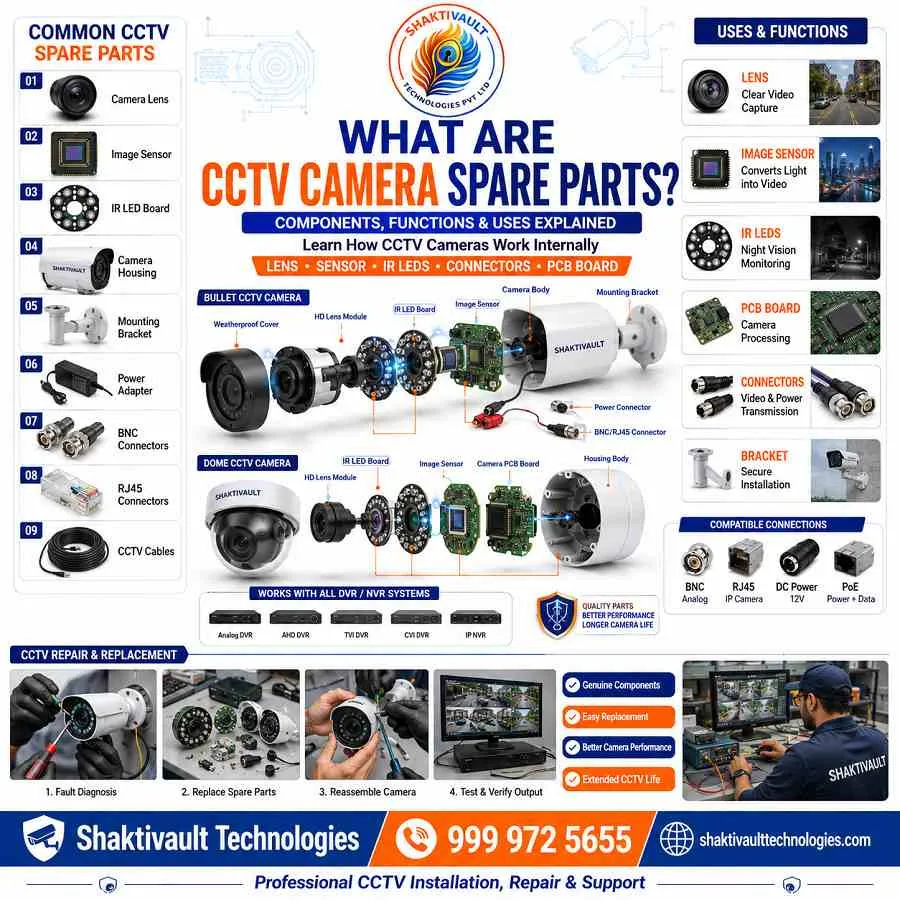
The heart of any security system is the CCTV camera itself. From dome and bullet styles to PTZ units, each has its special uses and advantages. Within each camera, several small but vital parts work together to provide clear footage, day and night.
Lenses, IR LEDs & Camera Modules
The lens of a CCTV camera plays a key role in the quality of the video footage it captures. The lens design, type, focal length, aperture, and zoom affect clarity, depth of field, and field of view. A lens of high quality can improve the sharpness of images, lessen distortion, and enhance the low-light performance. Infrared (infrared) LEDs can be just as crucial.
They allow night vision by illuminating the dark scene. If IR LEDs start to fade or fail, the quality of images at night is reduced significantly, and the LEDs need to be replaced. Higher-resolution sensors capture more detail. More sensitive sensors work better in dim light. Camera modules like these are among the most frequently used CCTV spare components.
Power Supplies, Adapters & Connectors
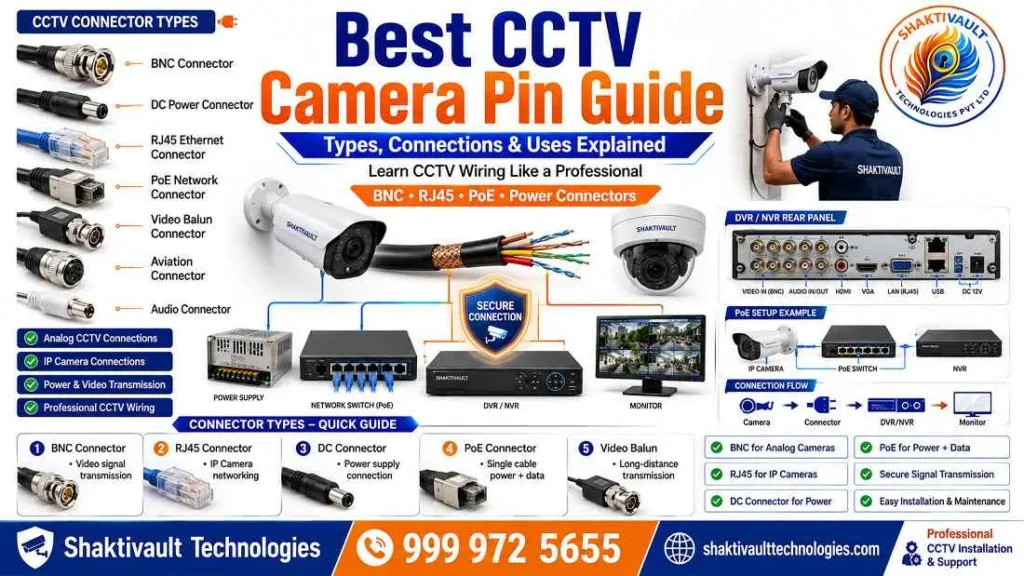
For uninterrupted performance, a reliable power supply is non-negotiable. CCTV cameras usually run on 12V DC power from a dedicated power adapter. A DC power connector is used at the end of the power cabling to supply power to analog and HD cameras. DC power connectors give cameras steady power. This helps keep performance consistent and extends camera life. Different CCTV power supplies meet different needs. Check that a replacement matches your system before you buy it.
CCTV Cable and Connector Components
Good wiring is the core of any effective CCTV system. The coaxial and Siamese cables, as well as Ethernet cables, should be managed well to prevent interference. This ensures that images remain clear. Knowing CCTV camera connector pins and types in your system helps you make fast, precise repairs.
BNC Connectors and DC Pins
BNC connectors are classic CCTV connectors for coaxial cables. They carry analog video signals like CVBS, AHD, CVI, and TVI.
They work with any video resolution. One major advantage of BNC connectors is that they send video signals over long distances without quality loss. This makes them ideal for large surveillance systems. BNC connectors are known for secure connections. They keep cables in place, even in harsh weather. The male connector is usually on the cable. The female connector is on the device, like a camera or DVR. If you use an RG59 Siamese cable, one connector sends video (BNC).
The other connector supplies power through a DC pin. These DC pin connectors are among the most common CCTV camera pin types. They often need replacement after physical damage or corrosion.
RJ45 Connectors for IP Cameras
This RJ45 connector, also called 8P8C (8-pin, 8-conductor), is the most common connector for IP cameras.
It is also common in Ethernet security systems. Connects Ethernet cables to NVRs, cameras, and routers. It can be used with various devices. One major benefit of RJ45 connectors is that they can send data and power through one cable. When used in conjunction with Power over Ethernet (PoE), they make installation easier and help reduce clutter on cables. To connect the IP camera system using the RJ45 connector, choose straight-through cables. You can use either the T-568A standard or the T-568B standard. The same standard should be used on both sides of the cable.
DVR and NVR Spare Parts
A DVR (Digital Video Recorder) or NVR (Network Video Recorder) is the heart of your security system. In the DVR, as well as the NVR, a number of important internal components work seamlessly. The motherboard, the hard drive, and the power supply are essential to the performance of the device. Understanding these components will help you solve issues efficiently.
Hard Drives and Storage Components
One of the most important parts of a security camera system is the hard drive. It stores the security footage. It allows users to view recorded camera video using a monitor with a DVR or NVR.
Users can also view it remotely over the internet. Hard drives are mechanical devices with limited lifespans. They are also among the most often replaced CCTV spare parts. Regular maintenance and cleaning can help prevent drive failure. It is also essential to back up recorded footage often. This way, if something goes wrong, you will not lose important video.
Power Boards and Cooling Fans
Cooling fans and power boards in NVRs and DVRs are often neglected. Yet they are vital for long-term durability. Cooling fans stop the unit from overheating by keeping air moving through its internal parts. In the case of a DVR or NVR, this may cause a rise in temperatures inside the unit. It is important to maintain it regularly. Make use of compressed air to eliminate dust. Make sure that cooling fans aren’t blocked. Replacement fans typically use two-pin power connectors. The fan’s voltage should be matched to ensure that there is no harm. If the cooling or power board is damaged, the whole recorder may stop working. This could put your recordings at risk.
How to Choose the Right CCTV Spare Parts
Compatibility with Your CCTV System
Before buying any replacement component, ensure that it is compatible with your current CCTV system. Examine the type of camera (analog or digital, IP, HD-TVI, AHD, or CVI). Review the model of the recorder. Verify the type of cable.
Check the power requirements. For example, NVRs work well with IP cameras and record in high definition. DVRs are best for analog camera setups. Using the wrong spare part can cause further damage and void any existing warranty. Shaktivault Technologies’ team can help you find the right part for your system. Call +91 – 981 094 0561 for expert help.
Genuine vs Generic Replacement Parts
Original (OEM) components are designed to fit the specific model of your device. They provide the highest level of assurance of quality and fit. The generic parts can be cheaper, but the quality could be different. Certain ones work well, but other parts could cause system problems or fail in the early stages. For surveillance systems in busy or mission-critical areas, always choose authentic and verified compatible parts. Shaktivault Technologies stocks OEM and authentic generic options at bargain prices. You can get the best value with no sacrifice.
Common CCTV Repairs Using Spare Parts

Fixing Power and Video Signal Issues
Two of the most common CCTV problems are power failures and video signal loss. If a camera shows no image, start by checking the DC power connector and power supply adapter. If the power supply works but there is no video, check the BNC connector and coaxial cable.
Examine for damage or corrosion. For IP camera systems, look for damage or corrosion. Check the RJ45 connector as well as Ethernet connection continuity. Replacing a defective CCTV camera pin connector, damaged DC adapter, or damaged BNC connector usually fixes the issue quickly.
Replacing Damaged Camera Components
When a camera is damaged, you can replace internal parts to make it work well again.
You can replace the lens.
You can replace the IR LED array.
You can replace the image sensor module. It often costs much less than buying a new camera. Replacing components can be hard. Only someone with electronics repair experience should try it. If you are unsure, seek professional repair services. Shaktivault Technologies provides component-level repair support. Call +91 – 981 094 0561 to book a technician. You can also order the part you need.
Maintenance Tips to Extend CCTV Lifespan
Regular Inspection and Cleaning
Regular system maintenance is the cheapest way to extend your security system’s lifespan. Clean your NVR or DVR regularly. Utilize compressed air or an easy brush to clean dirt and debris from inside the. Examine all cable connections, including BNC connectors, DC pins, and RJ45 connectors. Examine for signs of corrosion or loose components. Make sure that the cooling fans aren’t filled with debris. Check the drive often to make sure it works and records properly. Look at the live footage and the replay.
Preventing Weather and Electrical Damage
Outdoor CCTV cameras have to contend with temperatures, rain, humidity and dust. These elements can damage components over time. Install weatherproof housings, and make sure that all connector joints are sealed. To protect electrical components, install surge protection on power supply lines. They protect against spikes in voltage. Avoid placing your NVR or DVR in direct sunlight.
Additionally, make sure that the storage space is kept cool and well-ventilated. Installing spot coolers or cabinet fans can increase airflow and help prevent overheating. This can significantly extend the lifespan of your equipment for recording.
Conclusion
Keep Your CCTV System Running with Quality Spare Parts
A well-maintained CCTV system depends on the quality of every part, from the smallest CCTV Camera Pin to the hard drive. By learning key spare parts, what they do, and how to replace them, you can keep your surveillance system running well. It will stay reliable and responsive.
It will also remain cost-effective for years. Whether you need BNC connectors, IR LED modules, power adapters, or DVR cooling fans, Shaktivault Technologies has them all. You also get great prices.
Call Shaktivault Technologies at +91 – 981 094 0561. We guarantee the best prices on all CCTV spare parts. We also offer replacement components. Our expert team is ready to help you find the right part, every time.
FAQs – Best CCTV Camera Pin Guide
What is an RJ45 connector and why is it used in IP camera systems?
RJ45 (8P8C) is the standard Ethernet connector for IP cameras.
It carries network data and, with PoE, can also deliver power through the same cable.
Should I use T-568A or T-568B when wiring camera cables?
Use either standard, but be consistent. Keep the same standard at both ends. Use T-568A or T-568B. This ensures proper connectivity.
How often should I service my DVR/NVR hard drive?
Check drives each month for recording status and errors. Do backups often. Replace drives every 3 to 5 years. Follow use levels and maker advice.
What are common causes of video signal loss?
Video loss often comes from bad connectors (BNC, RJ45), damaged cables, power issues, or corroded contacts.
When should I choose OEM parts vs generic replacements?
Choose OEM parts for mission-critical systems or guaranteed compatibility. Verified generic parts are fine for budgets or non-critical setups if quality is proven.
How can I prevent DVR/NVR overheating?
Keep the unit dust-free. Ensure airflow is not blocked. Check or replace cooling fans if needed. Place recorders in a cool, well-ventilated area.
Can power and data run over the same cable for cameras?
Yes. Power over Ethernet (PoE) sends power and data through one Ethernet cable. This works when the camera and the switch or injector support PoE.